
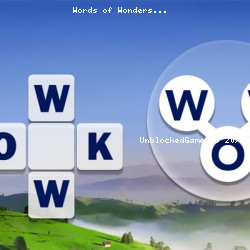
Play Words of Wonders – Instant Play Game
Famobi • 114.5K Plays • 457.6K Views • star 4.6 (5.3K)
All
Device
Both
Orientation
5.3K ratings
Rate This Game
gamepad How to Play Words of Wonders
Controls
Drag the left mouse button on the letters to assemble a word.
info About Words of Wonders
Looking for you can play anywhere? Words of Wonders is a great option with quick access and no setup needed. The team at Famobi used iframe to refine the gameplay experience.
Within the category, Words of Wonders reflects Puzzle, Mobile, Word, Skill, Educational, Mouse, Brain gameplay identity. Each play session in Words of Wonders creates a noticeable sense of progression.
Words of Wonders is a crossword puzzle where you connect letters to reveal hidden words. Test your vocabulary and find all the words to progress and reach more challenging levels. Will you become a master wordsmith in this delightful word game?
How to Play Words of Wonders
Words of Wonders is an engaging word puzzle game that combines the excitement of crossword puzzles with the thrill of word search. Players form words by connecting letters in a grid, unlocking hidden words,, and progressing through levels.
You'll see a grid of random letters when you start the game. Each grid represents a level; your task is to find words by connecting adjacent letters. You can swipe your finger over the letters in any direction (horizontally, vertically, or diagonally) to form words. Longer words and more complex combinations may unlock bonus rewards, so watch for opportunities to maximize your word choices.
Connect the letters to form a word. It will be revealed if the word you formed is on the crossword grid. Not all words will be on the grid, so use the letters you have already discovered to ensure you create words that will fit the puzzle!
Completing the grid allows you to unlock the next level, which gets progressively more challenging. The difficulty increases with more letters and words to find, so keep your brain engaged as you move through the game.
Some examples include finding the words “WON,” “OWN,” “NOW,” or “TOP,” “POT,” or “OPT” from a set of three letters. Or a mixture of three and four-letter words to form “WALL,” "ALL,” and “LAW.”
If you find yourself stuck, there are hints and boosters available to help you out. These tools can reveal letters or help you find the next word, though they're limited, so use them wisely. There are also rewards for completing levels or discovering difficult words, such as coins or additional hints, which can help you advance further.
Progress through the levels and collect unique background images with each new milestone. The levels get more difficult by introducing longer words and more letters, increasing the chances of getting it wrong and challenging your vocabulary skills!
Some levels feature specific themes, like landmarks or animals, where the words you form are related to that theme. As you progress, you’ll unlock different "worlds" or locations, each with unique challenges and puzzles. You also get fun bits of info throughout, like learning that The Great Pyramid of Giza is the oldest of the Seven Wonders of the Ancient World.
The goal is to find all the words in the grid before you run out of moves or time. Each level has a set number of words to complete in order to progress to the next stage. You may also encounter bonus rounds or challenges that offer extra rewards when completed.
As you move through levels, you'll earn points, coins, and other rewards, which will help you advance in the game. Some versions of the game also let you compete against friends or other players, adding a competitive element to the experience.
With its relaxing pace and engaging gameplay, Words of Wonders is a fun way to challenge your mind and expand your vocabulary while enjoying an immersive puzzle-solving experience.
Enjoy a range of exciting and challenging word puzzles in Words of Wonders. The game features an easy starting point to suit players of all ages and experience levels. See how good you are at finding all the words and become a master wordsmith!
Game Tips
- Use the letters you have already discovered as a clue to find the word
- Use the hammer icon to reveal a letter of your choice
- Click on the hints button to reveal a random letter
- Earn gems to buy hints and reveal letters
More Games Like This
Once you’ve reached your linguistic limits in Words of Wonders, check out more of our curated word games. There are many fun word games for all knowledge levels. Two popular choices to play next are Word Wipe, a word search game with a twist where you use letters from all around and in any direction; Word Scramble, a popular word game where you decode scrambled letters to uncover hidden words; or Word Search, a simple yet classic game offered in different languages.
Release Date
- April 2018 (Android and iOS)
- May 2023 (HTML5)
Developer
Words of Wonders was made by Famobi.
Platforms
- Web browser (desktop and mobile)
- Android
- iOS
Open Words of Wonders on UnblockedGames7676 and play instantly with no downloads. Continue the experience from Words of Wonders with Tower Defense or Garden Idle.
Technology
play_circle Words of Wonders - Gameplay
help Frequently Asked Questions
How do I play Words of Wonders? expand_more
What is the objective of Words of Wonders? expand_more
How can I improve in Words of Wonders? expand_more
Are there any tips for playing Words of Wonders? expand_more
Is Words of Wonders a difficult game? expand_more
Related Games

Shadow President: Illuminati

The Box of Secrets

Cozy Golf
Pixel Sphere 3D
Miner's Odyssey

Supermarket Together
Merge Battle Car
Rocket Boom: Space Destroy 3D

European Football Quiz
Jackal Zombie Survival
Overtitans: Destroyers of Worlds

Traffic Loop
Marble Run

Monochrome Looks

Sky Riders