Worms.Zone No Install Game
Peaky Muzzle • 19.2K Plays • 57K Views • star 4.5 (9.8K)
All
Device
Landscape
Orientation
9.8K ratings
Rate This Game
gamepad How to Play Worms.Zone
Controls
- Use mouse or left-right arrow to control the worm
- Use the left or right mouse button or space bar to speed up
info About Worms.Zone
Optimized for performance, Worms.Zone delivers a consistent gaming experience. Worms.Zone allows players to feel the appeal of gameplay within minutes.
With its .io online games, Grow, Mobile, Avoid, Premium Perks, Snake, Collect gameplay, Worms.Zone helps players relax quickly. Access Worms.Zone instantly through UnblockedGames7676 and jump into the action. You can find more experiences in Human Mech and Escape Road 2. unblocked games 76 at school
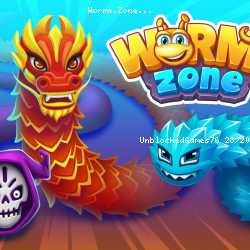
Worms Zone is an Io arcade game where you join the fight to become the biggest worm. You must eat as much food as possible to grow bigger. Slither your way towards the power-ups to get an edge.
How to Play Worms Zone
WormsZone.io is survival of the fittest. You're a worm, and you must eat and grow to be big and strong. Who knew being a worm could be so much fun? Try to trap your opponents so you can get all of their delicious food.
Pressing the left or right mouse button allows you to turbo-speed your worm. Use it sparingly and tactically to sprint ahead of the other players and secure big rewards, but be advised: the more you use your turbo, the faster your worm shrinks.
As you get larger, you get slower. Turbo also becomes more costly for your score, so use it sparingly when you are big and plentifully when you are small.
Be aware that upgrades you can buy in the menu don't make your worm perform better in the arena, but improve the effectiveness and/or duration of the power-ups found while playing, so don't be tricked by those.
Worm Outfits
Go to the wardrobe and pick an outfit fitting for the common worm. As you level up in the game, you can treat your worm to funkier and more colorful designs. Head to the worm's wardrobe on the main menu to pick a fresh new outfit.
Game Options
Head to the options menu to choose your favorite colors for the game. You can also pick between 3 different food types. You can find the options menu at the bottom right of the main menu.
Game Modes
There are various game modes to choose from. These are:
- Infinity - Keep playing and growing your worm until you fail.
- Time - a 7-minute game featuring double points and coins
- Treasure Hunter - Look for treasures on the map
- Seasonal - these are time-limited modes that appear during seasonal periods of the year
Power-ups
Keep your eye out for power-ups in potion bottles scattered around the arena. There are six types of power-ups in Worms Zone:
- Red and blue - Increase capture radius and pull in more food.
- Blue - Increase the amount of food eaten by five times.
- Purple - Reveal where other worms have perished.
- Green - Increase the speed of your worm.
- Round green - Improves control of the worm for collision avoidance.
- Yellow - Zoom out for a bird-eye view of the map.
You'll figure out what these power-ups look like as you slither through the land. You can also pick up coins that go into your coin stash.
Seasonal events
Make sure to come worming your way back for seasonal events over times like Christmas, Halloween, and Easter! You can play in exclusive, limited-time events to earn rewards throughout the festive seasons.
More Games Like This
Worms Zone, like many other .io games on UnblockedGames7676, is simple yet incredibly fun and addictive. The typical .io game features online multiplayer, minimal appearance, and is free to play.
A similar multiplayer game is Agar.io, where you'll also have to make sure your character grows. Snow Rider, instead, represents an entirely different experience for a solo game.
Features
- Cool colors and designs
- Power-ups give you an edge over the other worms
- Level up your worm and unlock more content
- Simple but fun and addictive!
Release Date
July 2018
Developer
Wild Spike made Worms Zone.
Platforms
Web browser
Android
iOS
Controls
Use the left or right mouse button to speed up.